How to choose returns management software: a five-step checklist
Most buyers start with a feature comparison and end up choosing on the demo. A better order is to describe your own operation first, then test the shortlist against it. The five steps below take an afternoon and remove most of the risk.
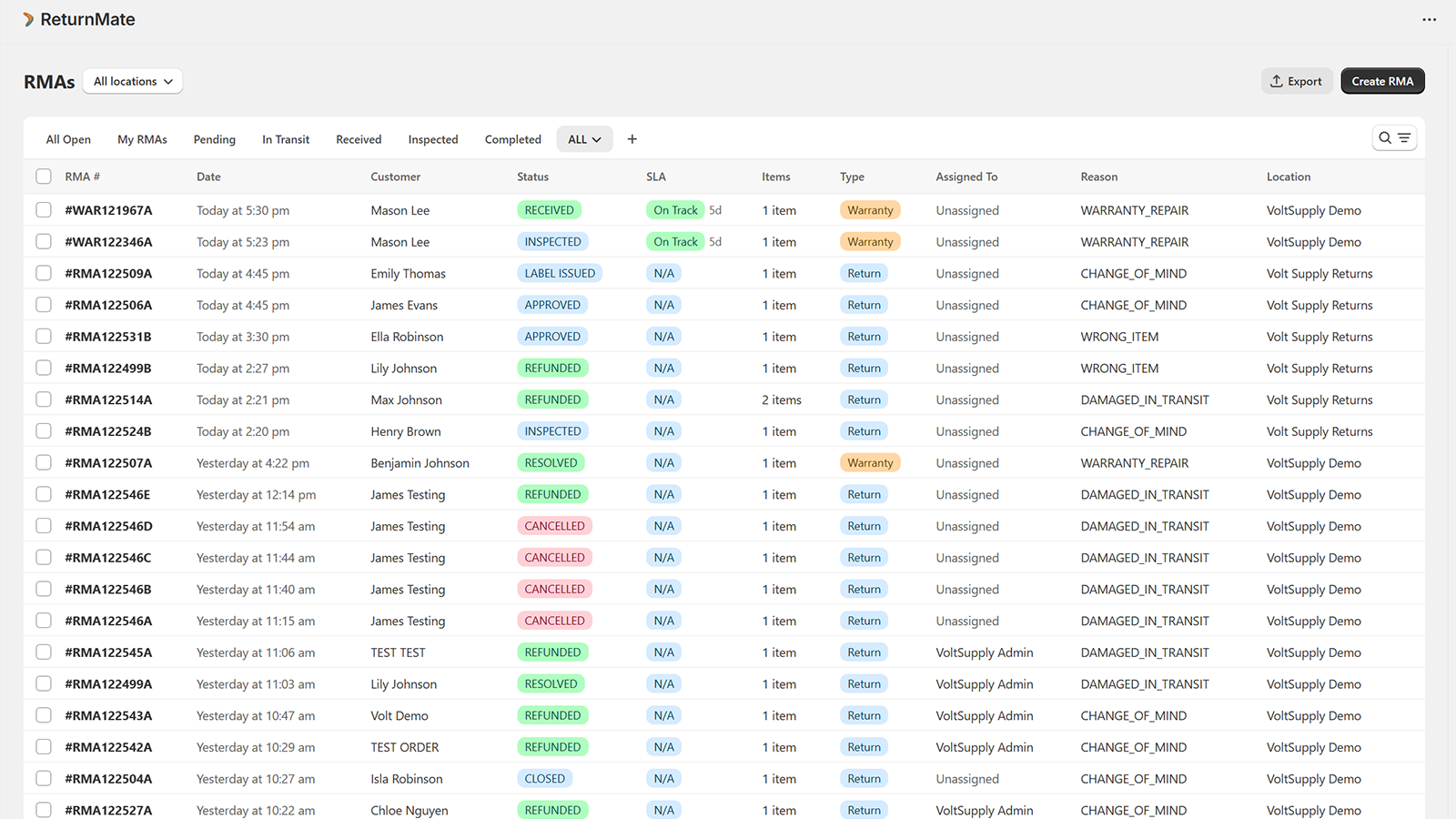
Count the workflow types you actually run. Change-of-mind, wrong item, damaged in transit, faulty within warranty, out-of-warranty repair, exchange, third-party repair. A tool that models only one return shape forces the rest into notes. The RMA management page lists the twelve ReturnMate runs, as a reference for what a full set looks like.
Map the systems that must stay in sync. Your store platform, the carriers you ship with, the warehouse or 3PL, the helpdesk and, past a certain size, the ERP. Write down which of these has to know about each return event, then check the integrations list of every candidate against that map rather than against a logo wall.
Check per-item resolution and the audit trail. Ask to see one return where one item is refunded, one replaced and one written off, and then ask to see the log of who did what and when. If either is missing, finance will feel it within a quarter.
Price it at your real volume. Take your average and your peak monthly returns and work out cost per return on each plan, including overage. A returns app comparison with entry prices is a starting point, not a substitute for the arithmetic.
Run a two-week parallel trial. Route at least twenty real returns through the new tool while the old process continues. Synthetic test orders tell you very little; real customers and real parcels surface the edge cases.
The clearest test of a returns system is whether a single return is one record with states, or a helpdesk ticket with a free-text field. If you have not seen the states, you have not seen the product. The RMA guide explains what a return merchandise authorisation record carries and why the number matters.
What returns management software actually does
Returns management software (sometimes called a returns management system or RMS) is the operational layer for the post-sale return lifecycle: customer-initiated return requests, coverage and policy decisions, label generation and inbound shipping, warehouse receiving, inspection, resolution (refund, exchange, replacement or repair) and the financial reconciliation that follows.
It sits between the ecommerce platform (Shopify, BigCommerce, Magento or a custom storefront), the carrier (Australia Post, FedEx, UPS, DHL and the rest), the warehouse (3PL or in-house), the helpdesk (Gorgias, Zendesk, Intercom) and the merchant's finance and inventory systems. The job is to keep all of those in sync so that one return event produces consistent records in every system that needs to know about it.
Where order management software focuses on getting product to the customer, returns management software focuses on getting it back, and on the decisions about what to do with it once it arrives. The two share infrastructure (orders, customers, inventory) but diverge sharply on workflow. The customer-facing end is a self-service returns portal; the warehouse end is scan-based receiving.
Why ecommerce returns are operationally distinct from retail returns
Brick-and-mortar returns happen in a few minutes at a counter. The customer brings the item, a staff member inspects it, the refund goes to the original payment method and the product goes back on the shelf or into the disposal bin. The loop is single-location and synchronous.
Ecommerce returns are not. The customer is remote, the item is in transit for days, inspection happens at a warehouse the customer never sees, and the refund-or-replace decision can involve diagnostics, supplier conversations or repair work. The customer expects visibility throughout, reasonably, because they have handed over both money and product and hold neither.
That asynchronous, multi-party shape is what generic helpdesks and order-management tools struggle with. A return modelled as a single ticket loses the distinction between "in transit", "delivered to warehouse but not scanned", "inspected" and "resolved". Each is a different state with different team responsibilities and different customer communication. Software built for the returns shape understands those states; generalist tools tend to paste them into a free-text field.
The eight capabilities a returns platform should have
Vendors will pitch dozens of features. Eight of them move the operational needle. The rest (auto-generated labels, a branded portal, basic email automation) are table stakes that any viable vendor includes. Prioritise these when you evaluate.
Native ecommerce platform integration. For Shopify-first merchants that means an App Store install, a deep connection to orders, customers, inventory, refunds and draft orders, and Shopify Billing for the plan [1][2]. Anything less means CSV imports and reconciliation. See how the Shopify integration works in ReturnMate.
Configurable workflow types. At minimum change-of-mind, damaged in transit, wrong item and faulty or warranty as distinct workflows with their own states. Single-workflow systems force every return into one shape.
Per-item resolution. Refund one item, replace another and write off a third on a single return, with the parent staying open until everything is resolved.
Carrier integration with rate shopping. Labels from one of several carriers chosen on weight, dimensions, destination and dangerous-goods status, with rates shown at the portal so the customer sees the real cost. Carrier coverage differs by market; check the carrier list against where you ship.
A branded customer portal with structured evidence capture. Photos, video, serial numbers and condition descriptions captured at submission, not chased over email later.
An audit log. Every status change, admin action and refund logged with user and timestamp. This is what makes finance and compliance conversations possible.
Analytics that drive supplier conversations. Return rate by SKU, fault categorisation, cost per return broken into carrier, labour, parts and write-off, and supplier credit ledgers. The returns analytics page shows what that reporting looks like in practice.
An external API and webhooks. For downstream sync with ERP, OMS, helpdesk and internal tooling. Without it you will be building file-based integrations a year from now; see the webhooks and REST API reference and the ERP integrations it feeds.
Generic vs Shopify-native: what changes
"Shopify-native" is used loosely. At one end it means an app that installs from the App Store, uses Shopify Billing, works against the Admin API and respects the platform's data model and webhooks. At the other end it means a generic returns tool with an embedded widget that pulls Shopify orders and writes back through a shallower connection.
The deep-native version saves real operational work. Refunds are issued through Shopify's own Returns API, so the order shows the refund correctly with the restock action attached [1]; replacements become Shopify draft orders, so downstream inventory and accounting see proper line items; the mandatory privacy webhooks are handled [3]; and the merchant is billed through Shopify rather than a separate subscription [2]. The difference shows up in audit cleanliness, not on the demo screen.
The shallower version saves engineering on the vendor's side and lets one product serve several platforms. That is a legitimate trade-off, but it often surfaces some months in as reconciliation friction: orders that show "refunded externally" with no line items, draft orders without the right tags, privacy requests that arrive late.
If you sell only on Shopify, a deep-native tool is usually the better default. If you run several platforms (Shopify plus BigCommerce plus a custom storefront), a generic tool can be the right answer precisely because it papers over the platform differences. Decide which side of that line you are on before you compare features.
Pricing and return on investment
Returns software is usually priced on one of three models: a flat monthly fee per store (predictable, ignores volume), a per-return charge above a threshold (scales with use, produces spiky bills), or tiers by feature plus a return cap, which is the most common. The right model depends on your volume profile.
For reference, ReturnMate's own ladder runs Free at US$0 for 5 returns a month, Starter at US$49 for 50, up to Enterprise at US$2,500 for unlimited returns, all in USD [4]. Other vendors publish comparable ladders; the comparison guide lists entry prices for the main Shopify apps.
Under about 200 returns a month, flat pricing usually wins. Above 500 a month, per-return models bite at month end and a tier with a cap becomes more predictable. Past 1,000 a month you are in enterprise territory, where the effective cost per return is the number to negotiate.
Return on investment for returns software is often calculated badly. The weak method counts licence cost against labour saved. The stronger method counts licence cost against labour saved plus supplier credits recovered plus support volume avoided plus write-offs reduced through better restocking decisions. In our experience the second-order effects can outweigh the labour saving several times over, but only if the system is used end to end.
Suppose a merchant compares a US$599 a month plan with a US$99 a month tool. If the dearer plan saves 20 operations hours a month at US$45 an hour (US$900) and recovers US$3,000 in supplier credits that would otherwise have been written off, it is roughly US$3,400 a month ahead before support volume is counted. The figures are illustrative assumptions, not customer data; put your own hours, rate and credit volume into the same sum.
Returns, warranty and repair: one system or three?
Returns management is the entry category, but many merchants find that the same records need to carry warranty claims and repair jobs within a year of installing. A warranty claim is a return with a coverage decision, a fault code and a supplier recovery attached; a repair job is a return with diagnosis, parts, labour and often a paid quote attached.
Running those in three tools splits the customer and order history three ways. Running them in one means the returns system must model the extra states rather than bolt them onto a ticket. If long warranty terms or bench repairs are part of your operation, read the warranty management software guide and the repair management guide for Shopify merchants alongside this one before you shortlist.
Build or buy: when does dedicated software make sense?
Building returns management in-house is technically straightforward. The data model is well understood, the integrations are documented and most of the work is plumbing. The reasons not to build are operational rather than technical.
Returns is a domain with a high rate of edge cases. Teams that build it tend to discover several new workflow types in the first year: counter swap, third-party repair, supplier exchange, multi-location transfer, dangerous-goods routing, gift returns. Each needs its own state transitions, admin screens and reporting, and each pulls engineering attention away from product work.
The buy decision becomes clear when one of three thresholds is hit: more than about 100 returns a month (the spreadsheet has stopped working), warranty or repair workflows entering the mix (the generic returns app has stopped working), or multi-location operations beginning (single-store assumptions in the existing tool start breaking). Below those thresholds, a spreadsheet or a light tool is a reasonable choice.
Migration: what to ask if you are switching
Switching returns management software is unusual but not rare, and is usually triggered by a volume or workflow ceiling, or by a new requirement (warranty, dangerous goods, multi-location) the incumbent does not handle. The migration itself is rarely the hard part. Data continuity is.
Three questions matter. First, can you export historical return data in a structured format from the incumbent? If not, you will run both systems in parallel until the open returns on the old one resolve. Second, does the new system accept imported returns with their original timestamps, so your reporting timeline stays continuous? Many do not, and you will keep a read-only archive of pre-migration data. Third, what is the cutover plan for in-flight returns: finish on the old system, dual-write, or move all open cases? Each has trade-offs that depend on volume and workflow complexity.
Allow four to six weeks for the migration, with the first two weeks spent parallel-running a subset of new returns to confirm the new tool handles your edge cases. Cut over in week four or later, not before.
Frequently asked questions
How much should returns management software cost?
Pricing ranges widely. Lightweight tools start around US$50 to US$100 a month per store and cap at low return volumes. Mid-market tools sit between about US$300 and US$900 a month and handle most workflow types. Enterprise platforms run US$1,500 a month and up on custom contracts. ReturnMate, for reference, runs from US$0 to US$2,500 a month. The right benchmark is not sticker price but cost per return at your actual volume, plus implementation overhead: a flat US$599 plan can be cheaper than a US$99 tool with a US$5 per-return overage once you pass 200 returns a month.
How long does implementation take?
For a Shopify-native returns app installed on an existing store, many merchants process their first real return within a day. Branding, workflow configuration and migrating in-flight cases typically take one to two weeks. Full operational maturity, with staff trained, edge cases handled and reporting configured, is usually four to eight weeks. Multi-store or multi-warehouse setups add two to four weeks.
What is the difference between returns management and order management software?
Order management software handles the forward flow: cart, payment, fulfilment, shipping, delivery. Returns management handles the reverse flow plus the operational work that follows (inspection, resolution, financial reconciliation, supplier credits). Some platforms span both; most do not. They share the order and customer record; the workflows are separate.
Do I need separate software for returns and warranty?
Functionally no: one platform that supports multiple workflow types can handle both. Operationally the warranty workflow has requirements (longer timelines, fault diagnostics, repair quotes, supplier credits) that are not first-class in a returns-only tool, so check that they are modelled as states rather than notes. The usual answer is one system with distinct workflow types, rather than two tools that do not share customer or order data.
Can returns software work with my 3PL?
Yes, if the software exposes a webhook or API the 3PL can call on inbound receipt and inspection events. Most modern platforms do. The integration is usually one-way: your returns system tells the 3PL which inbound parcels to expect, and the 3PL acknowledges receipt and condition. Two-way integrations, where the 3PL initiates the return, are rarer and worth confirming explicitly with the vendor.
Sources
- Shopify — Return object, GraphQL Admin API reference — The API a native app uses to create and process returns against the original order.
- Shopify — Billing requirements for apps — Apps in the Shopify App Store bill merchants through Shopify's Billing API.
- Shopify — Privacy law compliance webhooks — The mandatory data-request, data-erasure and shop-redaction webhooks every public app must handle.
- ReturnMate — Pricing — Plan prices and included returns quoted above, in USD.