How to manage warranty claims in Shopify
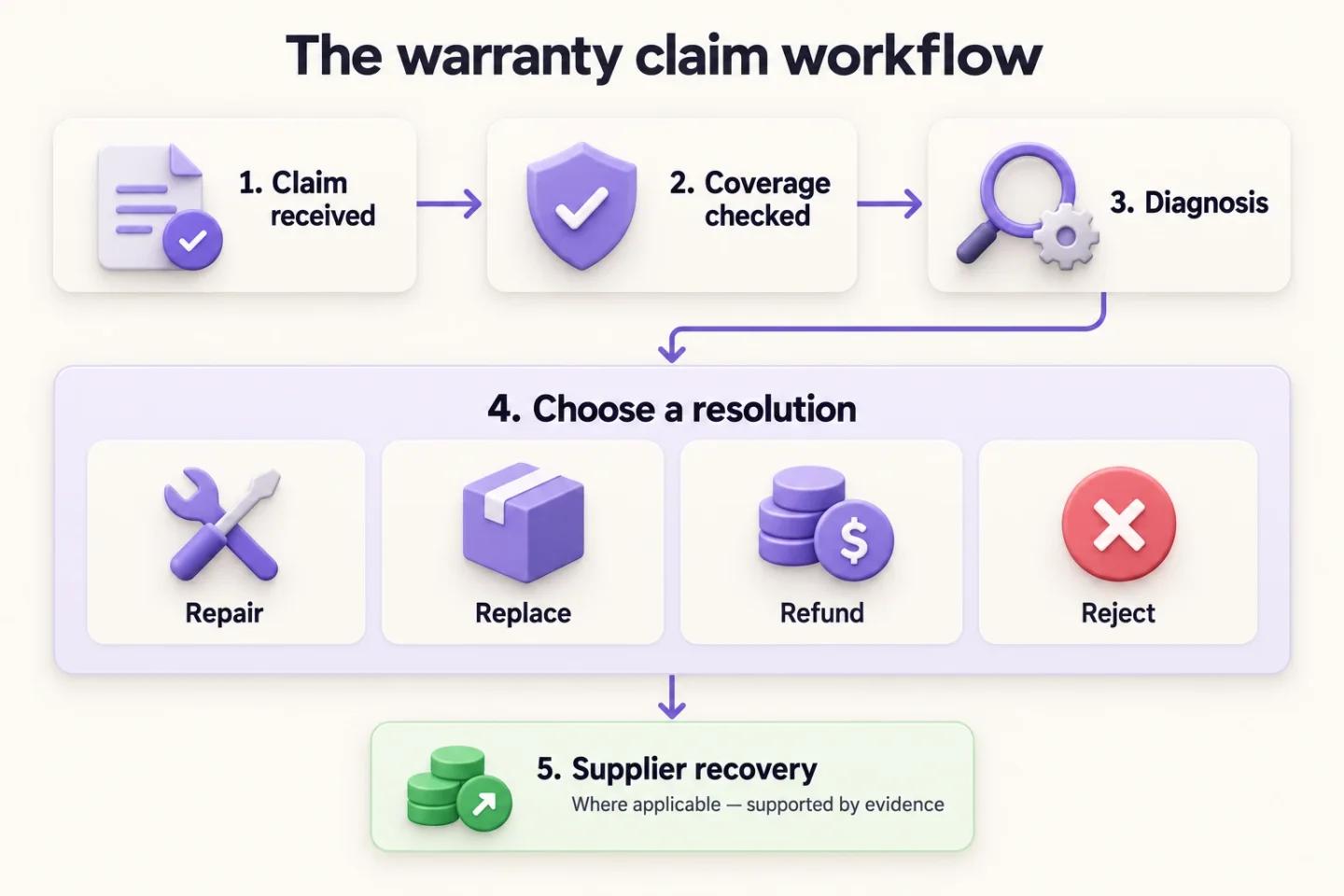
Shopify has no warranty workflow of its own. Orders, customers and refunds are there, but there is no claim record, no coverage check, no fault code and no repair job — so a warranty claim either lives in a returns app that treats it as a slow return, or in a dedicated warranty app that gives it its own workflow. Either way, the process you need to run is the same five steps below, and the order matters more than the tool.
If you only read one section, read this one. The rest of the guide explains which kind of app fits, what each step costs to skip, and where the money goes.
- Capture a structured claim
Serial number, proof of purchase, fault description and photos, collected in a portal before anyone touches the claim. Not an email thread.
- Check eligibility twice
Test the claim against your stated warranty term and, separately, against the consumer guarantees. Record both answers, because "the warranty has expired" is not a valid rejection on its own.
- Diagnose before you decide
Get the unit onto a bench and have a technician assign a fault code first. The resolution (repair, replace, refund or reject) comes after the diagnosis, never before it.
- Resolve, and quote the out-of-warranty work
Repair when parts and labour make it the cheapest option. Where the claim falls outside the term, send a paid repair quote through Shopify checkout instead of a polite no.
- Attribute the fault and claim from the supplier
Tie each coded fault to the supplier and batch, and raise credit claims on a schedule with serials, failure rates and photos attached.
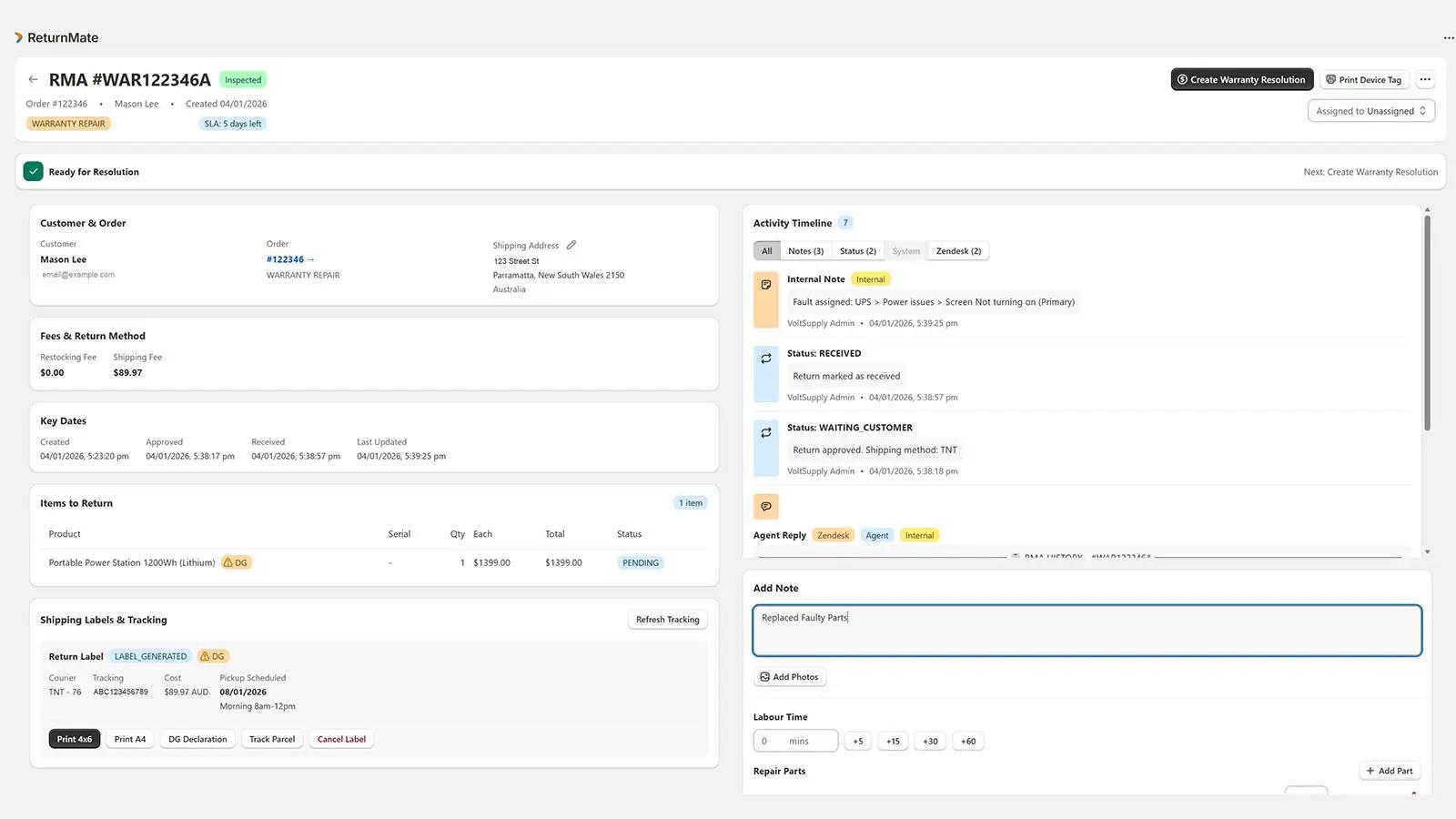
The same steps as they appear in ReturnMate. These are real screens from a demo store, not mock-ups.
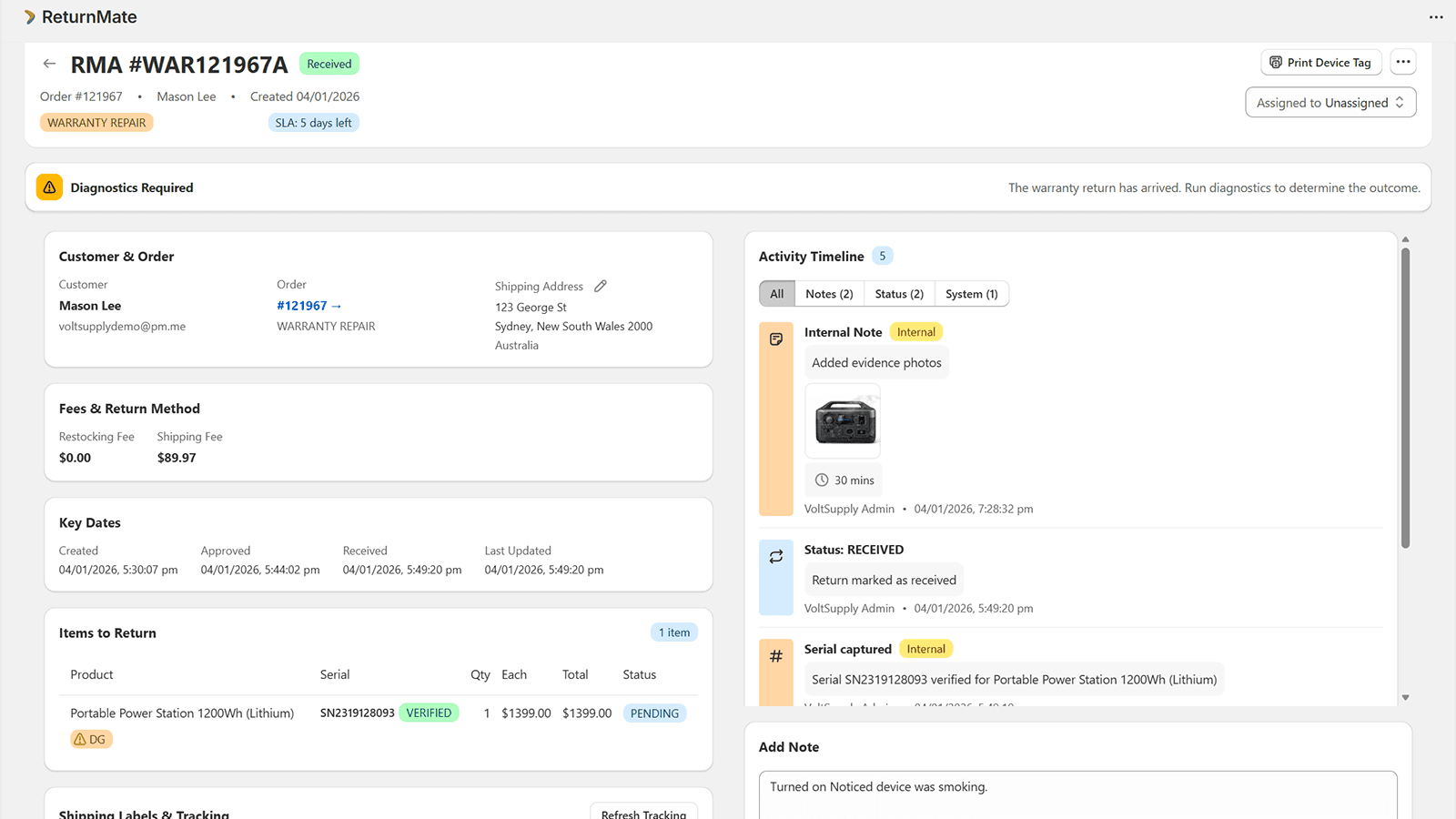
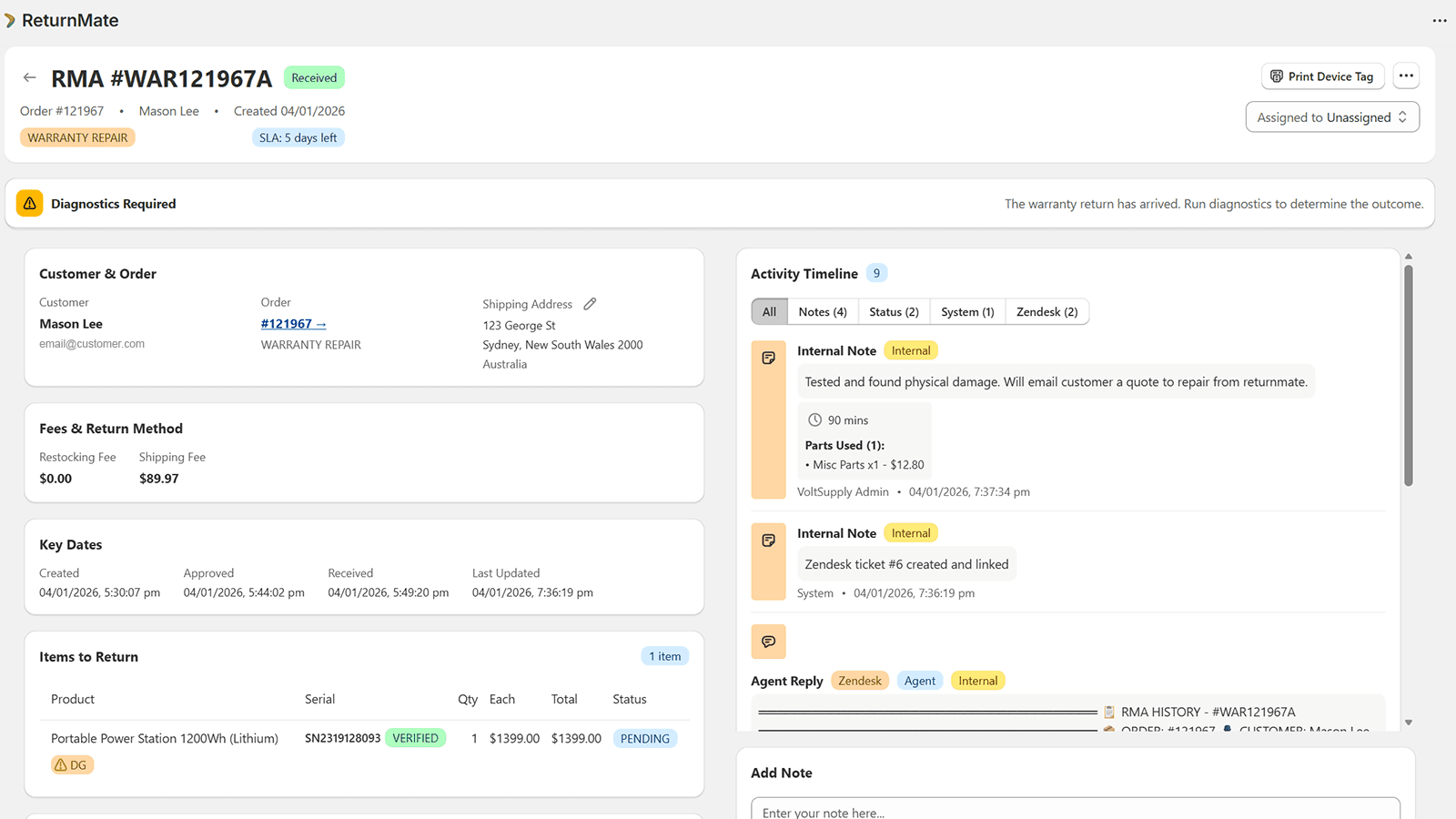
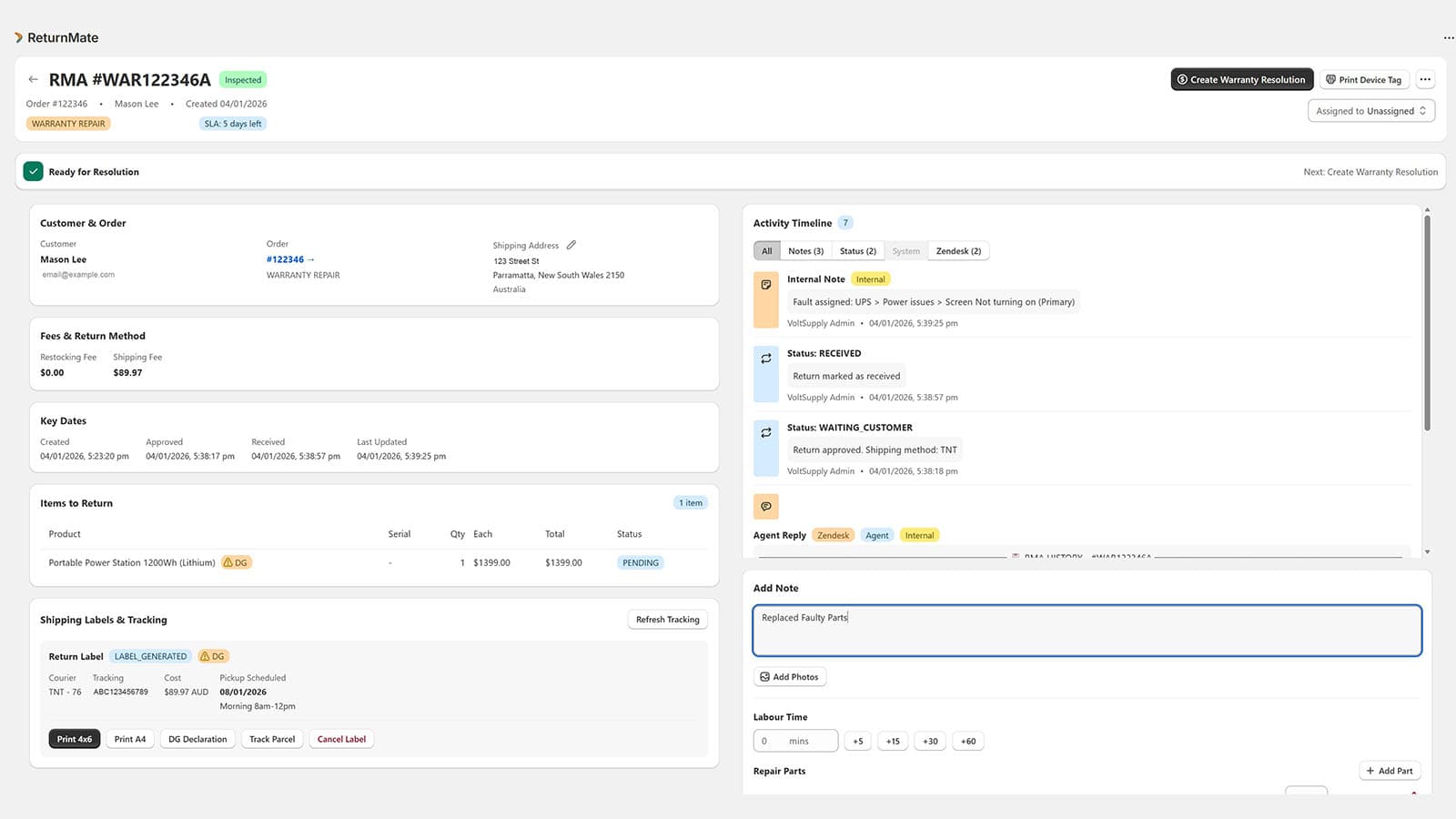
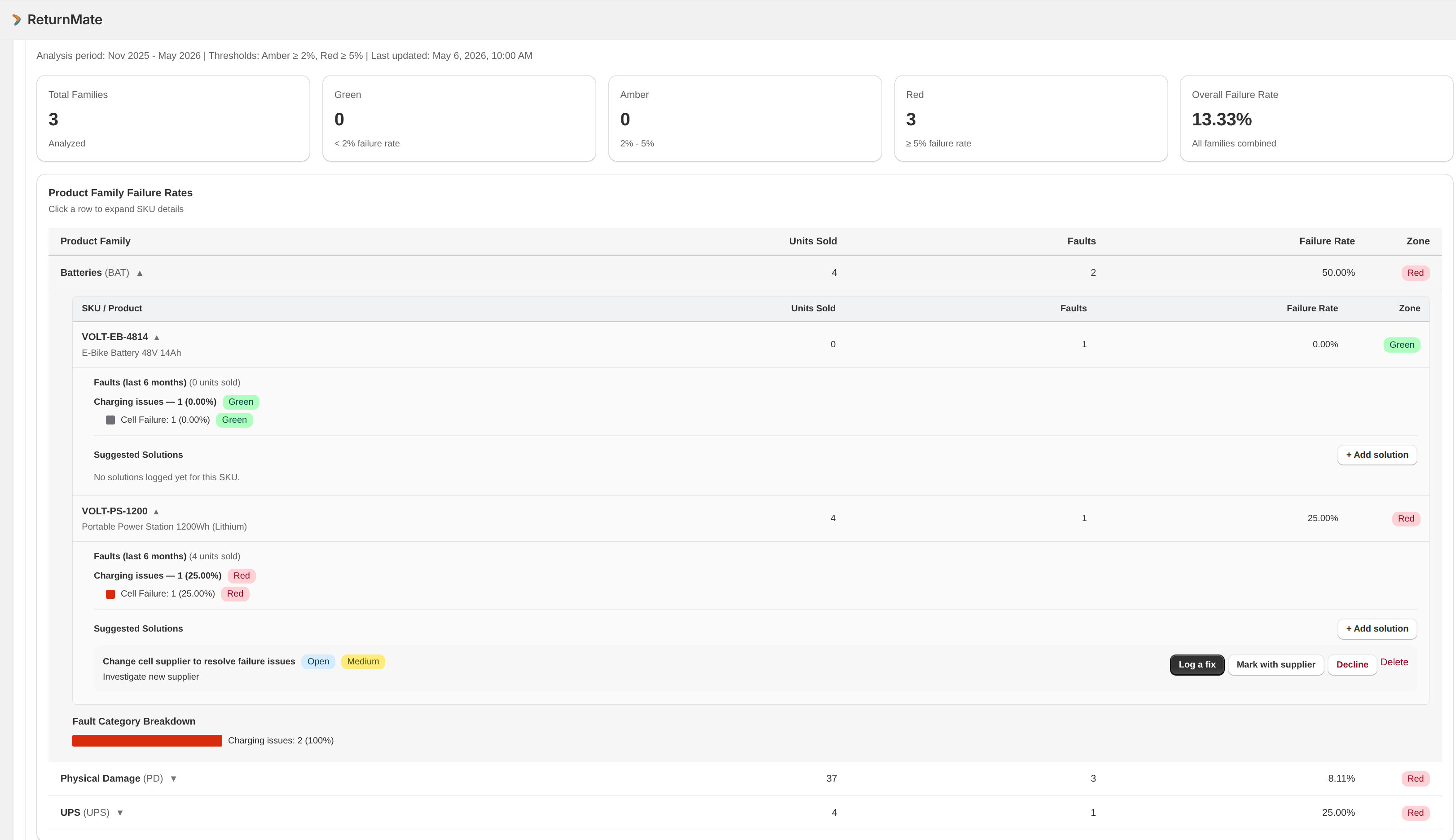
Every step needs a timestamp, an author and a reason behind it, kept for as long as your supply agreements and compliance obligations require. That audit trail is what turns a rejection into a defensible decision and a supplier claim into a quality finding. ReturnMate implements these five steps as its warranty workflow; the screenshots through this guide show each one.
Two pages: what to capture at warranty intake, and what a supplier claim pack needs. Download the warranty claim checklist (PDF). No email address required.
Warranty registration, claims management or extended warranties: which do you need?
"Shopify warranty app" covers three different products, and the App Store lists them side by side. They solve different problems, and merchants regularly buy one when they needed another. Work out which column you are in before you shortlist anything.
| Warranty registration | Warranty claims management | Extended warranties / protection plans | |
|---|---|---|---|
| What it does | Captures the product, serial and purchase date after the sale so the coverage is on file | Runs the claim itself: intake, coverage check, diagnosis, repair or replacement, supplier recovery | Sells a paid protection plan at checkout, usually underwritten and administered by a third party |
| Who it is for | Brands selling their own product who want a customer record and a marketing list | Retailers and brands that receive faulty goods and have to decide what to do with them | Merchants who want a revenue line from coverage and are happy for an insurer to handle claims |
| Where the claim happens | Elsewhere — registration apps hand off once a fault appears | In the app: it is the system of record for the claim | With the plan provider, not the merchant |
| Typical fit | Consumer brands, low claim volume | Electronics, tools, appliances, power and outdoor equipment, anything repaired rather than swapped | High-value goods with a mature accidental-damage market |
The three are not exclusive. A registration step is a good front end to claims management, and a protection plan can sit alongside both. But only the middle column runs the workflow in the section above, and it is the one this guide is about. ReturnMate sits in that column; so do the warranty features inside broader returns platforms, with less depth on the diagnosis, repair and supplier stages — see the warranty management software guide for how the categories compare.
What to look for in a Shopify warranty app
Once you know you need claims management, the shortlist comes down to whether the app models the whole workflow or only the front of it. Six capabilities separate the two. Ask for each one to be shown on a live claim, not described on a feature page.
- Serial tracking
The claim is raised against a serial number, the serial is verified on receipt, and the fault history follows the unit. Without it there is no supplier claim and no way to spot a bad batch.
- Coverage checks
Purchase date, product-level warranty terms and the statutory guarantee are on the record, and eligibility is a recorded decision, not an email judgement.
- Diagnostics and fault codes
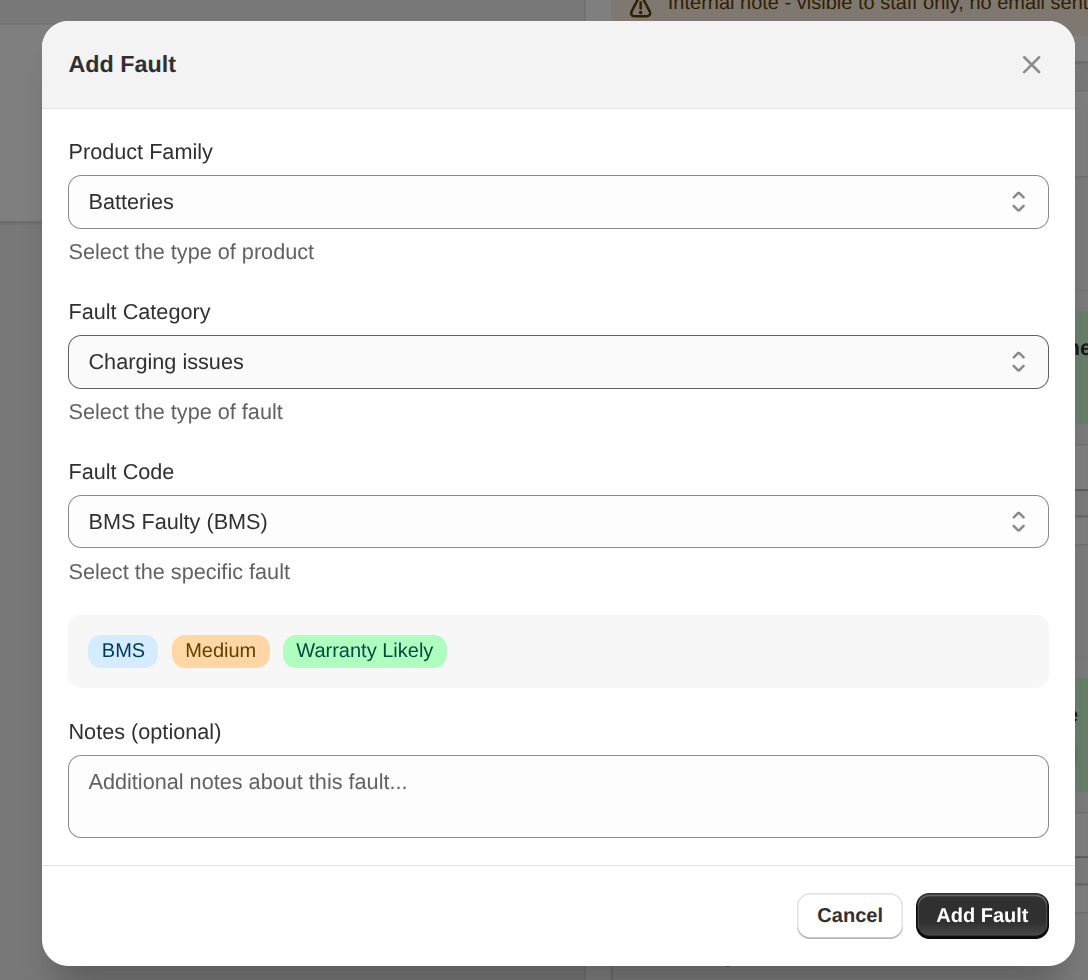
A technician can assign a structured fault code (family, category, code, severity) before the resolution is chosen, and the code is mandatory.
- Repairs, parts and labour
Repair jobs with technician assignment, parts consumed and labour time, plus a paid repair quote for out-of-warranty work that the customer pays through Shopify checkout.
- Customer updates
Status changes, label and pickup details and quote approvals go to the customer automatically, so the inbox stops being the workflow.
- Supplier claims
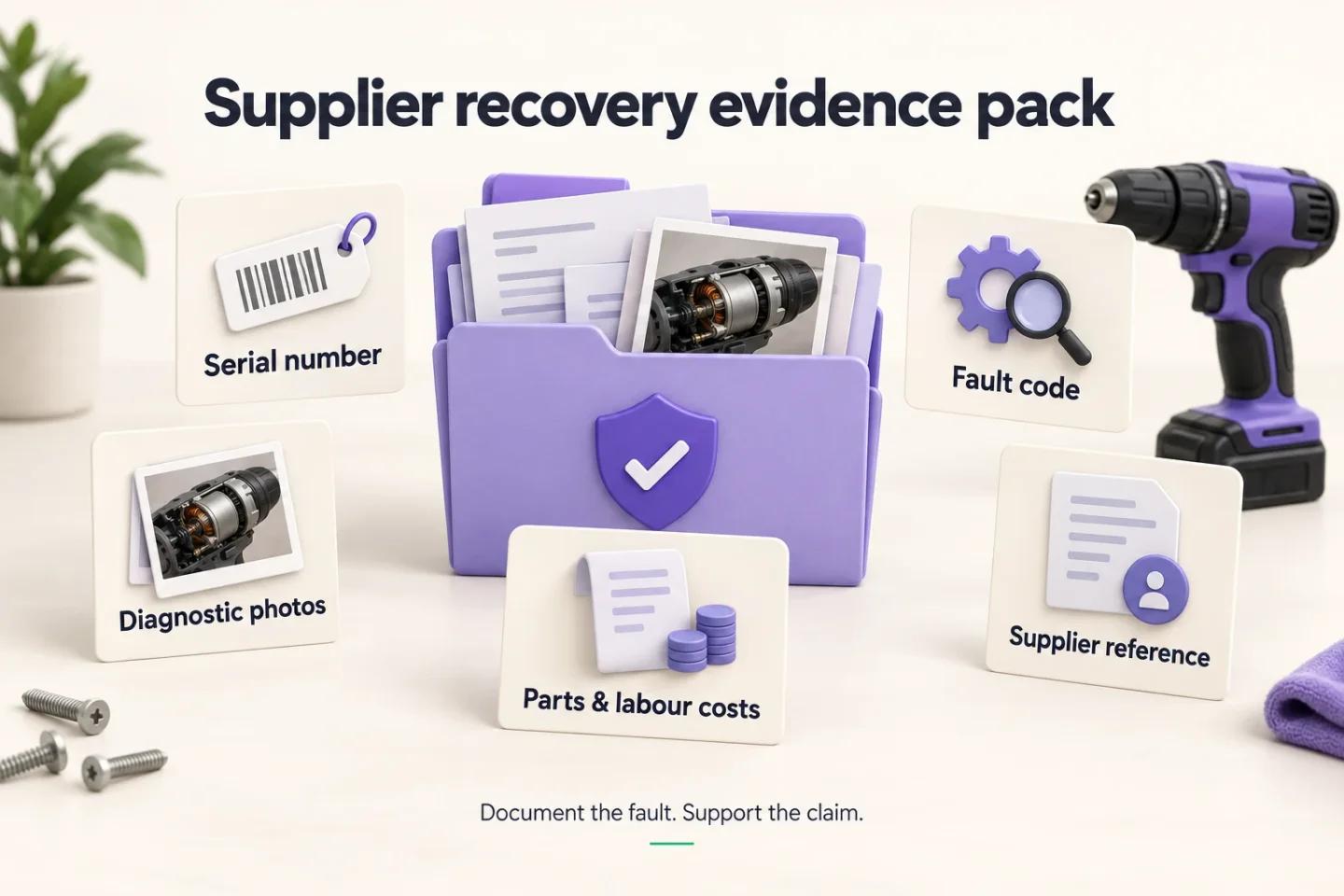
Faults roll up by SKU, batch and supplier with failure rates against units sold, and the evidence pack (serial, fault code, photos, costs) exports in one action.
Two Shopify-specific checks on top of that: the app should be billed through Shopify and read orders and customers directly, so the purchase date and the customer's order history are on the claim without re-keying. If your support team works in Gorgias, the Gorgias warranty integration puts the claim's status on the ticket and syncs the conversation, so the sixth capability holds across both systems. The Shopify warranty app page shows each of the six on ReturnMate screens; use it as a script for whichever apps you evaluate.
Shopify warranty apps compared
Most of the Shopify warranty apps that come up in search sit in the first two columns of the table above: registration, claims management, or both. Below are five that appear most often for Shopify warranty searches, plus ReturnMate, described from each app's own Shopify App Store listing. They are not ranked. Each card says what the app is built for and what to ask its vendor before you choose it.
| App | Built for | Claims and repairs, per the listing | Price for the claims workflow (USD) |
|---|---|---|---|
| Dyrect | Registration and claims for product brands | Customer warranty portal with claim tracking; repair and replacement workflows on Claims Pro | Free plan lists claims management; Claims $49/mo; Claims Pro $149/mo. Each includes 100 credits, then $0.20 a credit |
| My Product Registration | Registration, warranty claims and authenticity checks | Registrations and warranty claims, with a form builder and serial or code verification | $15/mo, all features |
| DGT Smart Warranty | Warranty programs, claims and RMAs inside the Shopify admin | Claims with repair, replacement, refund and other resolutions; Shopify Returns API labels on Growth | Claims start on Growth at $99/mo (1,000 a month); Free and Starter list 0 claims |
| Product Registration Supreme | Product and warranty registration | Registration forms and serial-number validation; no claims workflow described | $9.99–$39.99/mo; serial validation from $19.99 |
| AfterShip Returns | Returns and exchanges, with warranty on its top paid plan | Warranty management portal and dashboard on Premium | Premium $119/mo, 100 returns included, then $1 a return |
| ReturnMate | Returns, warranty and repairs for products that need inspection | Fault codes, technician repair jobs with parts and labour, paid repair quotes, supplier claims | Free $0 (5 RMAs); Starter $49/mo (50 RMAs) |
Prices are each listing's monthly price in USD on 17 October 2026, before usage charges, and the tiers are not equivalent packages, so price the shortlist at your own claim volume. The cards below link to the listing each one was checked against.
The six warranty apps in more detail
The same treatment for each: what the app is good at, and the questions to put to its vendor before you choose it.

Dyrect
Registration + claimsRegistration and claims in one customer portal. Customers register by QR code or on your site, raise claims and track their status; your team assigns claims to staff in a tracker synced with Shopify products and orders. Repair and replacement workflows, with automatic repair or replacement orders, sit on the Claims Pro plan.
Ask what counts as a credit and how many a claim uses at your volume. Ask whether a claim can carry a technician's diagnosis, labour and parts, and how faults are reported back to a supplier.

My Product Registration
Registration + claimsA long-running registration app from Varify covering product and warranty registration, warranty claims, a form builder and an authenticity checker that verifies serial numbers or codes. One flat monthly price with every feature included.
Ask how a claim moves once it is submitted: its statuses, diagnosis, repair or replacement, and whether it links back to the Shopify order. Confirm the flat price covers your registration and claim volume.

DGT Smart Warranty
Claims managementWarranty programs, claims and RMAs run from the store dashboard, with no separate portal. The listing covers automatic warranties on purchase, product-specific terms, a choice of resolutions from repair and replacement to gift card or rejection, multi-brand support, and Shopify Returns API labels and a REST API on its Growth plan.
Free and Starter list no claims, so price it from Growth. Ask how a repair is tracked (technician, parts and labour), whether an out-of-warranty repair can be quoted and paid for, and how fault data reaches your suppliers.

Product Registration Supreme
RegistrationLow-cost product registration: a registration page styled to your theme, predefined and custom fields including receipt upload, order, product and serial-number validation, multilingual forms, and export or sync to Shopify.
It is a registration front end. Ask where a claim goes once a fault appears, and whether registration data can feed the claims tool you use.

AfterShip Returns
Returns + warrantyA returns and exchanges platform whose Premium plan adds a warranty management portal and dashboard, so warranty claims sit beside returns in the same tool and alongside AfterShip's tracking products.
Ask what happens after a warranty claim is accepted: technician assignment, labour and parts, paid repair quotes and supplier recovery, and which plan each sits on. Ask whether warranty claims count against the 100 returns Premium includes.

ReturnMate
Returns + warranty + repairsReturns, warranty and repairs in one Shopify app, built for products that need inspection or repair: mandatory fault codes, technician repair jobs with parts and labour, paid repair quotes through Shopify checkout, supplier claim exports, and dangerous-goods documents for lithium returns.
Ask which plan your volume lands on. Warranty claims and basic repairs are on every plan except the $29 Returns plan, from 5 RMAs a month free; richer repair workflows start on Growth ($299/mo) and failure-rate analytics on Scale. Prices in USD.
Why a warranty claim isn't a return
Most returns apps model one thing: a customer changed their mind, the item comes back, money goes out. Five states, one decision, done. That model is fine for apparel and it breaks immediately for anything with a motor, a battery or a circuit board in it — consumer electronics, appliances, power tools, and anything with a lithium battery inside.
The difference isn't the length of the window. It's that a warranty claim has a diagnosis step in the middle, and everything downstream depends on what that diagnosis finds. You can't decide the resolution until you know the fault, you can't recover cost from a supplier until you've coded the fault, and you can't defend the decision later without the evidence you captured while diagnosing.
Ten times the handling time, five decision points instead of one, and a compliance obligation attached to the outcome. Forcing that through a change-of-mind workflow doesn't make it simpler — it just moves the complexity into spreadsheets and email threads where none of it is measurable.
The four resolutions, and the one that pays
Every warranty claim ends in one of four places. Which one depends on the diagnosis, the warranty status and — in Australia — whether the failure is major or minor under the consumer guarantees. Most merchants default to replace because it's fast, which is precisely why their warranty costs look the way they do.
Cheapest resolution when parts are available and labour is in-house. Also the only one that generates revenue when the item is out of warranty and the customer approves a quote.
Fast and customer-friendly, but you now hold a faulty unit with no diagnosis attached. Replace without triage and the supplier claim disappears with it.
Required where the failure is major and the customer elects it. Highest cost outcome, and the one most likely to have been avoidable with earlier triage.
Out of warranty, misuse, or no fault found. Defensible only with documented evidence — photos, fault code, technician notes and timestamps.
Claims that fall outside the warranty term are usually closed with a polite no. A paid repair quote sent to Shopify checkout converts a share of them instead — the customer already wants the item fixed, and you already have it on the bench. Quotes carry an expiry and a decline path, so the work you were previously turning away becomes a job with a price on it rather than a goodwill favour.
Where warranty margin actually leaks
Warranty cost doesn't leak in one obvious place. It leaks in six small ones, none of which looks serious on its own, which is exactly why it persists for years. Below is the pattern we see most often, worked through for a hypothetical merchant running around 80 claims a month. The dollar figures are a worked example built from the assumptions listed under the table, not measured results from a customer.
How the worked example is built. Change any input and the total moves with it — the point is the shape of the leak, not the precise figure.
- 80 claims a month (960 a year) on products averaging about $750, with bench labour at $65 an hour and a loaded admin cost of about $90 an hour.
- Supplier credits: roughly 55% of claims trace to a manufacturing fault, with an average recoverable cost of about $182 each — around $96,000 left unclaimed when faults are never coded.
- Admin time: about 20 minutes a claim spent chasing serials, proof of purchase and photos, or roughly $28,000 a year at the admin rate above.
- Replaced instead of repaired: about one claim in seven swapped for new stock when a part-and-labour repair would have cost around $235 less.
- Freight paid twice: a second freight leg averaging $58 on about one claim in four.
- Out-of-warranty claims honoured: around 8% of claims fall outside the term but are approved for want of a purchase date, at about $250 each.
- Repair revenue never billed: around 12% of claims are out-of-warranty work that could be quoted at about $190 on average.
None of these require new headcount to fix. They require the fault code to be mandatory, the purchase date to be on file, and the resolution decision to happen after diagnosis rather than before it. The reporting that falls out of a mandatory code is covered on fault tracking.
Supplier recovery: the part most merchants skip
If a supplier ships you a batch with a failing component, the cost of those failures should sit with the supplier. Most supply agreements make the supplier responsible for manufacturing defects, though the terms, the claim window and the evidence required vary, and it is worth checking what yours actually say. Where merchants fail to recover, the usual reason is not that the supplier refuses outright — it's that the merchant can't produce evidence at the granularity the claim requires: failure rates against units shipped, by SKU and by batch, with the fault code and serial on each unit.
A supplier credit claim needs four things, and most warranty processes capture none of them consistently: the fault coded to a specific failure mode, the affected serial numbers, the failure rate against units shipped, and photographic evidence tied to each unit.

| What you have | What the supplier does | Typical outcome |
|---|---|---|
| "Lots of these are failing" | Asks for specifics you don't have | Claim dies quietly |
| A spreadsheet of RMA numbers | Disputes whether faults are manufacturing-related | Partial credit, heavily negotiated |
| Fault-coded claims with serials | Verifies against their own batch records | Credit issued, subject to your supply terms |
| The above plus a failure rate by batch | Escalates internally to their QA team | Credit plus a design or process fix |
The last row is where this stops being an admin exercise. A merchant who can demonstrate that one batch fails at, say, 6.8% against a 1.2% baseline (illustrative figures) isn't asking for a favour — they're presenting a quality finding. That conversation changes the commercial relationship, and it's only available to merchants whose warranty data is structured enough to produce it.
Replacing a faulty unit before anyone diagnoses it feels like good service, and it usually destroys the supplier claim in the same motion. The unit goes back to the customer's bin or your dead-stock shelf, no fault code exists, and the cost is now permanently yours. If you take one thing from this article: diagnose before you resolve, even when you already know you're going to replace it.
What this looks like in practice: an Australian camping and 4WD retailer
One ReturnMate merchant, an Australian retailer of portable power, 12V lithium batteries and camping and 4WD accessories, has agreed to have its warranty process described here without being named. No figures are quoted. The point is the shape of the workflow on a catalogue that is hazardous, heavy and a long way from the warehouse at the same time.
A claim starts in the portal with the serial number, purchase and photos. Once it is approved, the portal asks the customer to confirm or edit the pickup address, pick a date from the next business day onward and choose a morning or afternoon window. ReturnMate books the collection with TNT or Team Global Express from the availability the carrier reports for that postcode, and attaches the dangerous goods declaration to the RMA when the product carries a lithium profile. Australia Post is excluded automatically for those SKUs, and anything over 22 kg goes as freight.
When the unit reaches the bench, the technician records the fault code, labour time and parts on the same record before an outcome is chosen, which is the diagnosis step from the workflow at the top of this guide, the one every downstream recovery depends on. Where the confirmed fault is a manufacturing defect, the serial, fault code and photos export as the claim pack described in the supplier section above, and the supplier's return authorisation number and credit are tracked on the RMA.
Carrier selection comes from the product profile, not the operator: lithium excludes post, weight selects freight.
The customer schedules the pickup. A missed TNT pickup retries the next business day, and a second miss raises a pickup-failed notification so staff can re-book or switch to depot drop-off.
Per-product return instructions, such as draining fuel before collection, are shown in the portal before the pickup is booked.
Evidence, fault code and serial sit on one RMA, so the supplier claim is assembled rather than reconstructed.
The screens on the caravan, camping and 4WD page show this workflow: an RMA with a TNT collection booked for a morning window and the DG declaration beside the label, and the fault capture a technician completes before a warranty outcome is decided.
The merchant asked not to be identified and no performance figures are quoted. Everything above is what the workflow does as configured on their account. It is not a claim about savings, volumes or recovery rates, and the worked-example costs elsewhere in this guide remain illustrative.
Your obligations under Australian Consumer Law
This is where warranty management stops being an operational preference and becomes a legal one. Australian merchants carry obligations that exist independently of whatever warranty terms they publish, and a workflow that can't distinguish between the two will eventually get one of them wrong.
The short version: consumer guarantees under the ACL apply automatically, can't be excluded or limited, and sit alongside any manufacturer or extended warranty [1]. A warranty expiring does not end your obligations — the guarantee period is whatever is reasonable for the price and nature of the goods, which for a $2,000 appliance is considerably longer than twelve months [2].
| Aspect | Consumer guarantee (ACL) | Manufacturer warranty |
|---|---|---|
| Source | Statutory — applies automatically | Contractual — offered voluntarily |
| Can be excluded | No, never | Yes, terms are the supplier's own |
| Duration | A reasonable period for the price and product type | A fixed stated term |
| Who the customer claims from | The retailer who sold it | Usually the manufacturer |
| Who chooses the remedy | Consumer, if the failure is major | Whatever the warranty document says |
| Remedy for minor failure | Supplier may choose repair, replace or refund | Per the warranty terms |
Two operational consequences follow. First, "your warranty has expired" is not by itself a valid rejection — your workflow needs to record why the claim also falls outside the statutory guarantee. Second, the major-versus-minor distinction determines who picks the remedy, so it needs to be a field a technician fills in, not a judgement made in an email.
The practical requirement is documentation. If a claim is rejected and the customer escalates to a state fair-trading body, the question is what evidence supported the decision. A fault code, technician notes, dated photographs and a recorded major/minor assessment answer that in minutes. An email thread does not.
This section summarises how the consumer guarantees interact with warranty workflows at a practical level. It isn't legal advice, and obligations vary with what you sell and to whom. Check the ACCC's consumer guarantees guidance, and get advice specific to your category before you finalise policy wording.
Building a warranty workflow that holds up
A warranty process that recovers cost and survives scrutiny has five properties. None are exotic, and the order matters more than the tooling. It is also, step for step, the workflow ReturnMate implements: intake through the customer portal, coverage checked against the policy on the product, diagnosis on the bench or in ReturnMate Tech, and the supplier claim built from the fault record — each shown with screens on warranty and repairs.
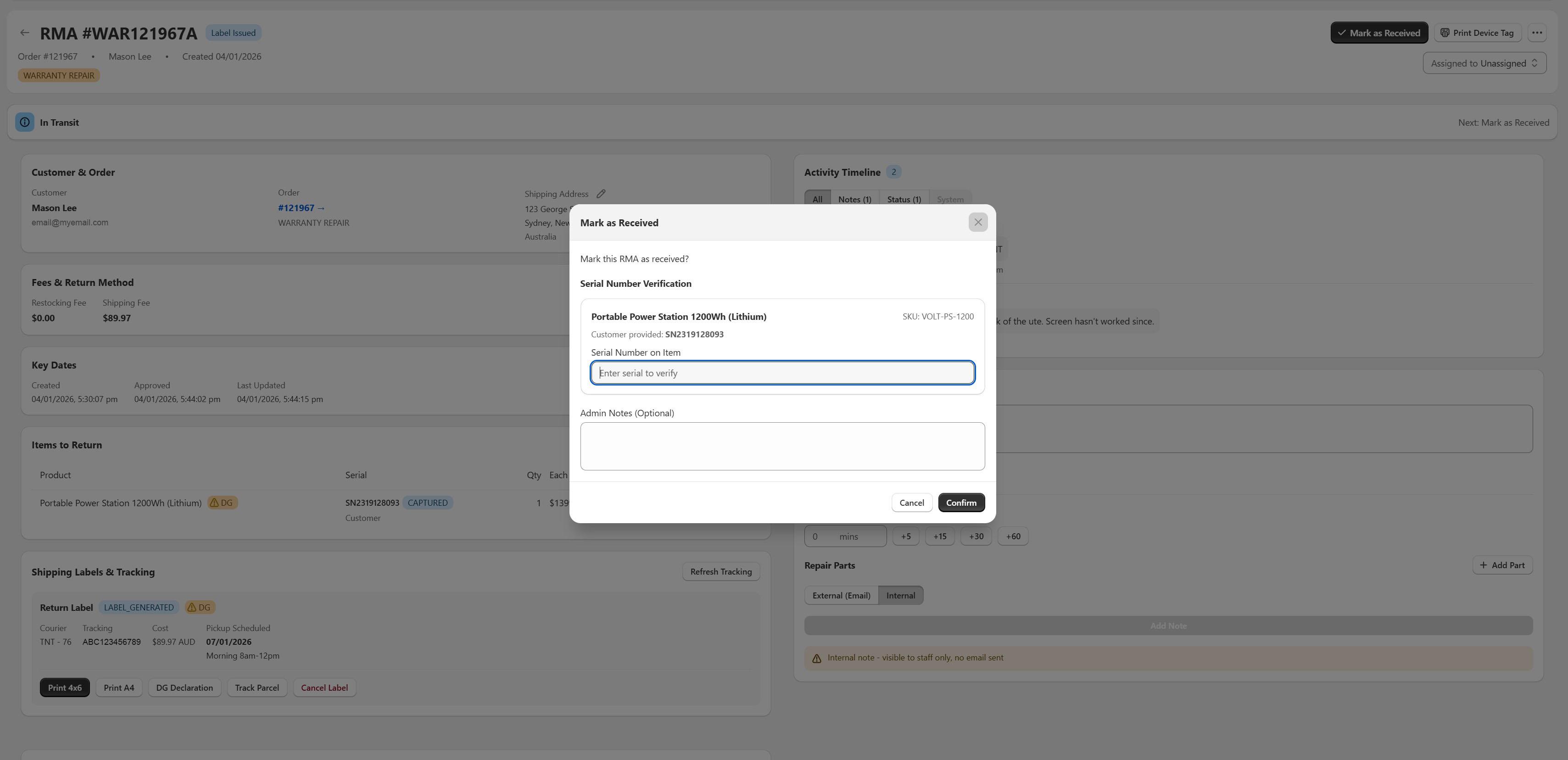
Serial, purchase proof, fault description and photos captured before a human touches the claim.
Check the warranty term and the statutory guarantee separately. Record both answers.
Fault code assigned before the resolution is chosen. Never the other way round.
Fault tied to supplier and batch, credit claim raised on a schedule, not ad hoc.
The fifth property isn't a step — it's a constraint that has to hold across all four. Every action needs a timestamp, an author and a reason, retained long enough to cover both your supplier agreements and your compliance obligations. Dangerous-goods records in particular carry retention requirements well beyond the life of the claim — see dangerous goods returns in Australia for what the transport document has to say and how long it has to be kept.
If you sell anything with a lithium cell in it, the workflow also has to route the inbound leg through a DG-capable carrier with the right transport documentation. That's a separate problem with its own rules — covered in the dangerous goods returns guide linked below.
If you change one thing this quarter, make the fault code mandatory before a resolution can be recorded — even in a spreadsheet. It's the field every downstream recovery depends on, it takes a technician fifteen seconds, and within a quarter you'll have enough data to see which SKUs and which suppliers are actually generating your warranty cost. If you're choosing a tool to do it in, the warranty management software guide covers the three categories on the market and how to evaluate them; the caravan, camping and 4WD page shows the same workflow on a catalogue where the battery, the fridge and the bullbar all carry different terms. The intake and supplier claim checklist (PDF) condenses both lists to two printable pages.
Frequently asked questions
Can I run warranty claims through my existing returns app?
Mechanically, yes — you can raise a return, add notes and use tags as pseudo-statuses. The problem is that everything a warranty claim needs becomes unstructured: fault codes live in free-text notes, technician time isn't tracked, supplier attribution doesn't exist as a field, and the audit trail is whatever someone remembered to type. It works at low volume. Past roughly 20 claims a month the reporting gap becomes the expensive part, because you can't recover from suppliers using data you never structured.
How long do I have to honour a warranty claim in Australia?
Your stated warranty term is a contractual commitment with a fixed end date. The consumer guarantees under the ACL are separate and don't have a fixed period — they last for whatever is reasonable given the price, nature and expected durability of the goods. For inexpensive accessories that may be shorter than a stated warranty; for high-value appliances or tools it's often considerably longer. Practically, this means the warranty expiry date is one input to an eligibility decision, not the whole decision.
What's the difference between a major and minor failure?
It determines who chooses the remedy. A major failure — the product is unsafe, substantially unfit for purpose, or significantly different from what was described — lets the consumer choose between a refund or a replacement. A minor failure that can be fixed within a reasonable time lets the supplier choose whether to repair, replace or refund. Because the classification changes who holds the decision, it should be a recorded field on the claim rather than an implicit judgement.
Should customers pay return freight on a warranty claim?
Where the consumer guarantees apply and the goods have failed, the customer shouldn't bear significant cost to return them — particularly for large or heavy items, where collection is generally expected to be arranged. Charging freight on a legitimate warranty claim is both a compliance risk and a customer-experience problem. The freight cost is real, but the place to recover it is the supplier who shipped the defect, not the customer who bought it.
How do I get suppliers to actually pay warranty credits?
Make the claim specific enough that verifying it is easier than disputing it. That means fault codes rather than descriptions, serial numbers rather than counts, failure rates against units shipped rather than raw totals, and photographic evidence attached per unit. Then claim on a schedule — monthly, in a consistent format — instead of raising ad hoc requests. Suppliers process structured recurring claims through their QA function; they push back on one-off emails because those are indistinguishable from goodwill requests.
Which Shopify warranty app should I use?
It depends on what happens after the claim is approved. If most claims end in a refund or a straight replacement, the warranty module inside a general returns app is usually enough. If claims involve diagnosis, repair, parts and labour, paid out-of-warranty quotes or supplier recovery, you need an app that models those as states on the record rather than notes on a ticket. ReturnMate's warranty and repairs feature page (returnmate.io/features/warranty-repairs) sets out how it handles that side; the [Shopify warranty apps compared](#apps-compared) section of this guide covers six apps, from registration tools to claims and repair platforms, with what each is built for and its price.
Is it worth charging for out-of-warranty repairs?
Usually, yes — provided quoting is built into the workflow rather than handled manually. The customer has already sent the item in and wants it working, and you already have it on the bench with a diagnosis attached, so the marginal cost of completing the repair is low. The reason most merchants don't capture this revenue isn't pricing resistance; it's that generating and collecting on a quote takes more admin effort than saying no. Route the quote through Shopify checkout and the effort disappears. The paid-repair side, from counter intake to collection, is covered in the [repair management guide](/hub/repair-management-shopify).
Sources
- ACCC — Consumer rights and guarantees — Guarantees apply automatically under the Australian Consumer Law and sit alongside any warranty; acceptable quality and durability depend on the price and nature of the goods.
- ACCC — Repair, replace, refund, cancel — What counts as a major problem, and that the consumer chooses between refund and replacement when the failure is major.
- Competition and Consumer Act 2010, Schedule 2 (Australian Consumer Law) — The statutory text: ss 54–59 (guarantees), s 260 (major failure), ss 259–263 (remedies).